



Building Loconundrum, a rail station daily guessing game
2026-03-29I wanted to brush up on React and learn some cloud infrastructure. The project I made was Loconundrum, a daily game (think Wordle or Connections) where you guess a rail station in the UK.
Each guess reveals the travel time to today’s rail station, and a Wordle-style breakdown of the station’s three-letter CRS code that you find on train tickets. Here’s what a series of guesses might look like (latest guess first):
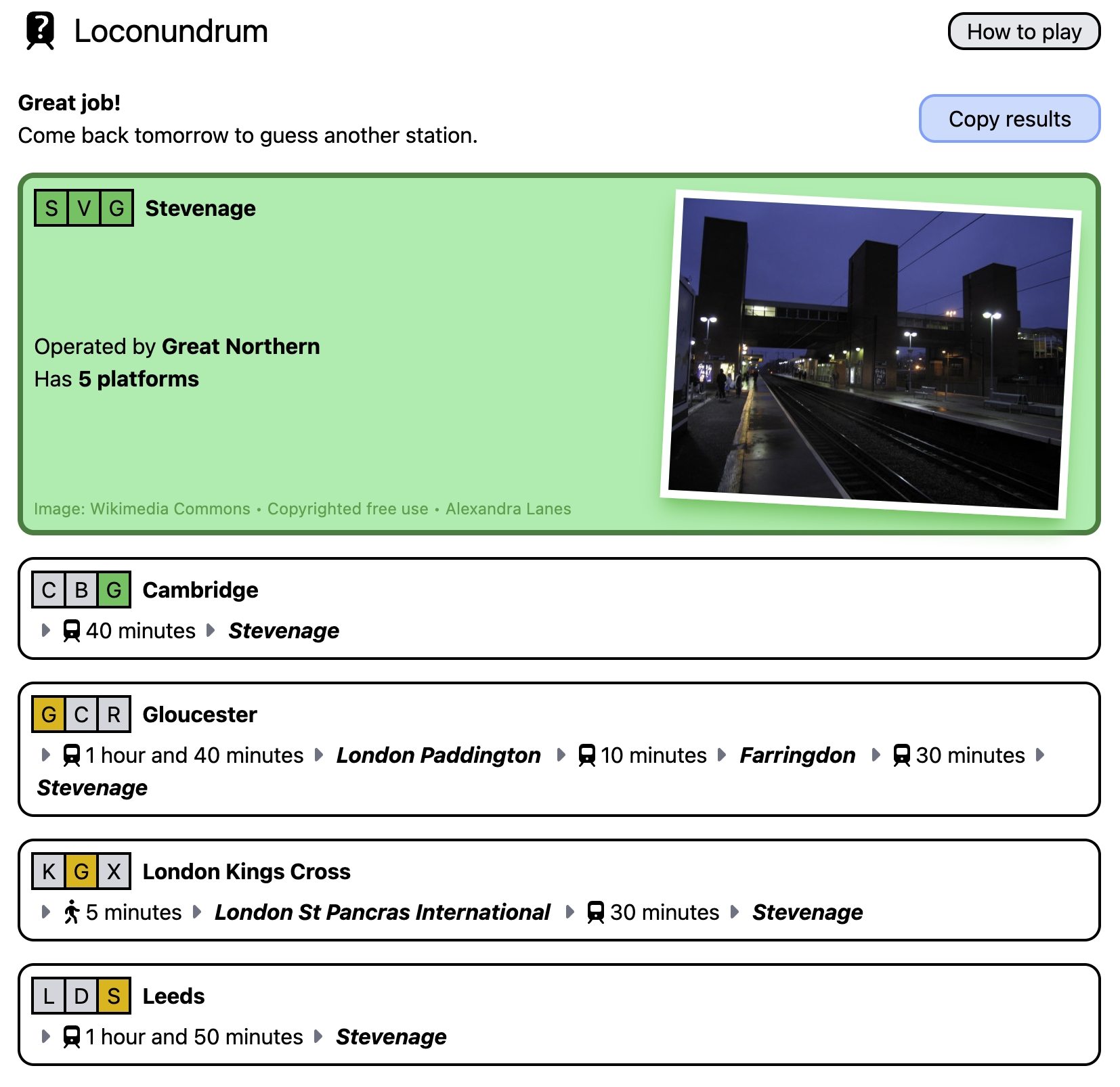
To show the travel time, you need data about train services in the UK. How do you know that it takes 1 hr 50 min to get from Leeds to Stevenage? What’s the best route when you need multiple changes at different stations along the way?
All of this train data processing ended up being much more difficult than the concepts I was actually trying to learn. But it works now, should continue working for a while, and has seemed to provide decent routes whenever I’ve played Loconundrum.
What do I want?
A couple of key requirements up front:
-
I only need vague, usual-case journey times. I don’t need to know that you could catch the 10:32 from Leeds to York for 21 minutes. I only need to know that it takes about 20 minutes to get from Leeds to York.
-
I wanted to be able to pre-calculate all journey times for a particular destination. Loconundrum players should never need to wait for a network request; each guess should come with instant feedback. This means calculating routes from all ~2,500 UK rail stations to that day’s answer in advance. While only a fraction of those are likely to be used for guesses, I don’t want to prevent people from guessing their favourite/local station.
Can I get National Rail to do it for me?
National Rail operate free and paid data services which you can use for information about the rail network. One of these is the Real Time Journey Planner (RTJP), a SOAP API which gives you the best routes between two stations.
This is a paid service costing £0.00042 per request. This sounds very cheap - it would be, for many applications. However, my upfront calculations would come to 2500 × £0.00042 = £1.05 per puzzle, or £30 per month. A bit pricey for a hobby project.
It also seems rather… formal? You have to sign a contract to be able to use this, and there’s a delay on your access while everything gets approved. This seems like a service aimed at ticket retail platforms, but I’m just A Guy Making A Fun Little Game.
RTJP’s out - what other options do I have?
Using timetables
Static rail timetables are completely free! You can sign up for an account on the National Rail Data Portal, and then download long-term timetables in a structured data format.1
These are in a funky proprietary record format, with fixed-width lines describing services:
BSNP554292603152603150000001 POO9H70    122206000 EMU378 075D     S            O
BX         LOYLO489000
LOBATRSPK 2244 22442  AL     TB
LIFACTRYJ           2246H00000000
LIWNDSWRD 2247 2250H     224722502        T
...
LIHAGGERS 2325H2326      232623261        T
LTDALS    2328 23293     TF
The first two characters of each line are a record type.
BS and BX describe some metadata about a service, then subsequent LO, LI, and LT records describe the Origin, Intermediate and Terminating calling/passing points respectively.
This is a static description of all rail services over a very long period, which sounds like exactly what I need. Now, what do I do with this data?
✨ Algorithms ✨
Exploring my Mind Palace for crumbs of knowledge from my Computer Science degree, I recognise that a rail network looks a bit like a graph.
If you can construct a graph out of all of these routes, you could use some kind of shortest-path algorithm (Dijkstra/A*) to route along the network. For these kinds of algorithms, you need to assign a cost to the edges between each station in the graph.
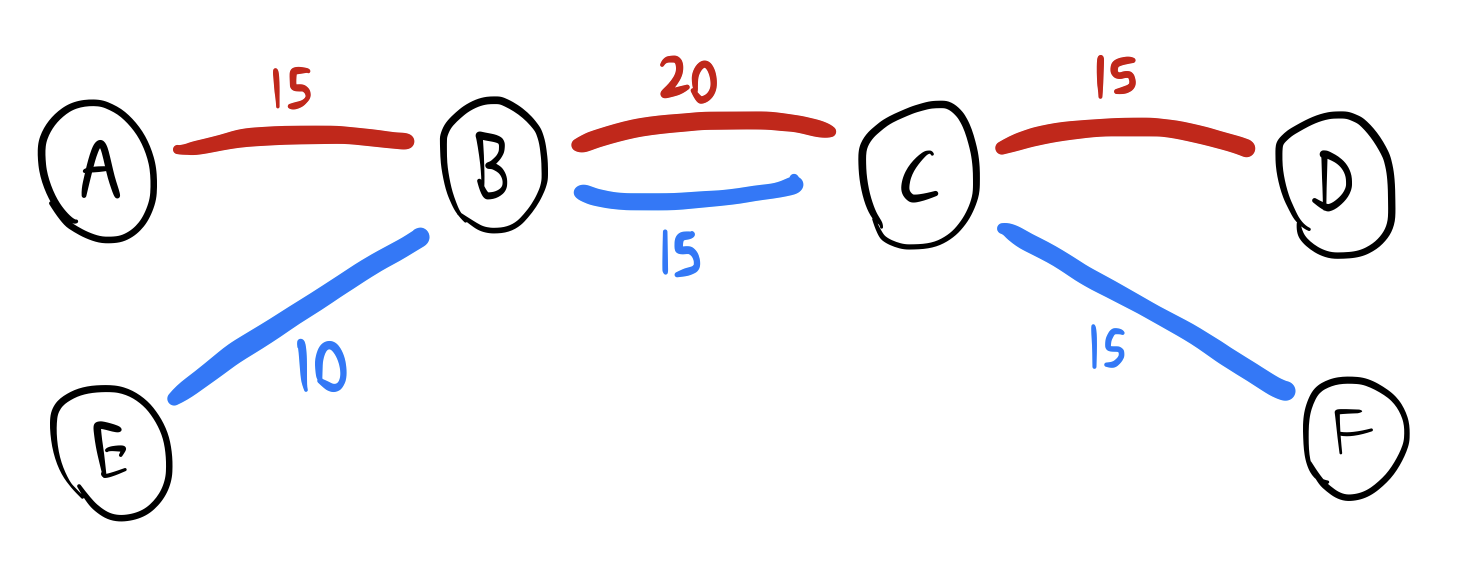
Suppose we processed our timetable data to build a graph with journey times between stations for all train services. Here there are six stations A-F, and two train services, “red line” and “blue line”. The costs I’ve assigned here - written on the edges between stations - are the journey times in minutes.
In some unambiguous cases, this works fine:
- Travelling from A to B: take the red line for 15 minutes.
- Travelling from E to F: take the blue line all the way through B and C to F, for a total of 35 minutes.
- Travelling from A to F: take the red line for 15 minutes from A to B, then change at B onto the blue line. B to C is faster on the blue line, so you might as well change at B.
But what about travelling from A to D? A graph algorithm using only the travel-time costs might tell you to:
- Travel from A to B on the red line
- Change onto the blue line at B, and travel to C
- (Because the blue line is marginally faster than the red line for this leg)
- Change back onto the red line at C, and travel onto D
- (Because the blue line doesn’t go to D)
By the raw travel time numbers, that is the fastest route. But… really? I don’t think a person would do this. You could just stay on the red line for the whole journey, and it would only be slightly slower.
There’s a time associated with changing trains which this simple graph model doesn’t consider. Even if the changing time is only 2 minutes, changing is still technically faster, but not enough to make changing worth the effort!
This is something that needs to be factored into your cost function. There should be some kind of cost penalty for a change, which you can fine-tune to get sensible routing. An algorithm which takes this into account would ideally route A to D along the red line the whole way.
In summary, the simplest possible routing graph isn’t going to do a good job here.
Surely this is a solved problem? I did a bit of Googling and found RAPTOR (Round-Based Public Transit Routing), a graph algorithm which is specifically designed for public transit. However, when the first result for a concept is a bunch of links to technical papers, I’m over my head!
I will remind you that I am trying to learn React and cloud stuff here. I realised this might be a bit too hard for me, and started looking for solutions rather than algorithms. This helped me to finally settle on an approach for routing:
Just glue open-source software together
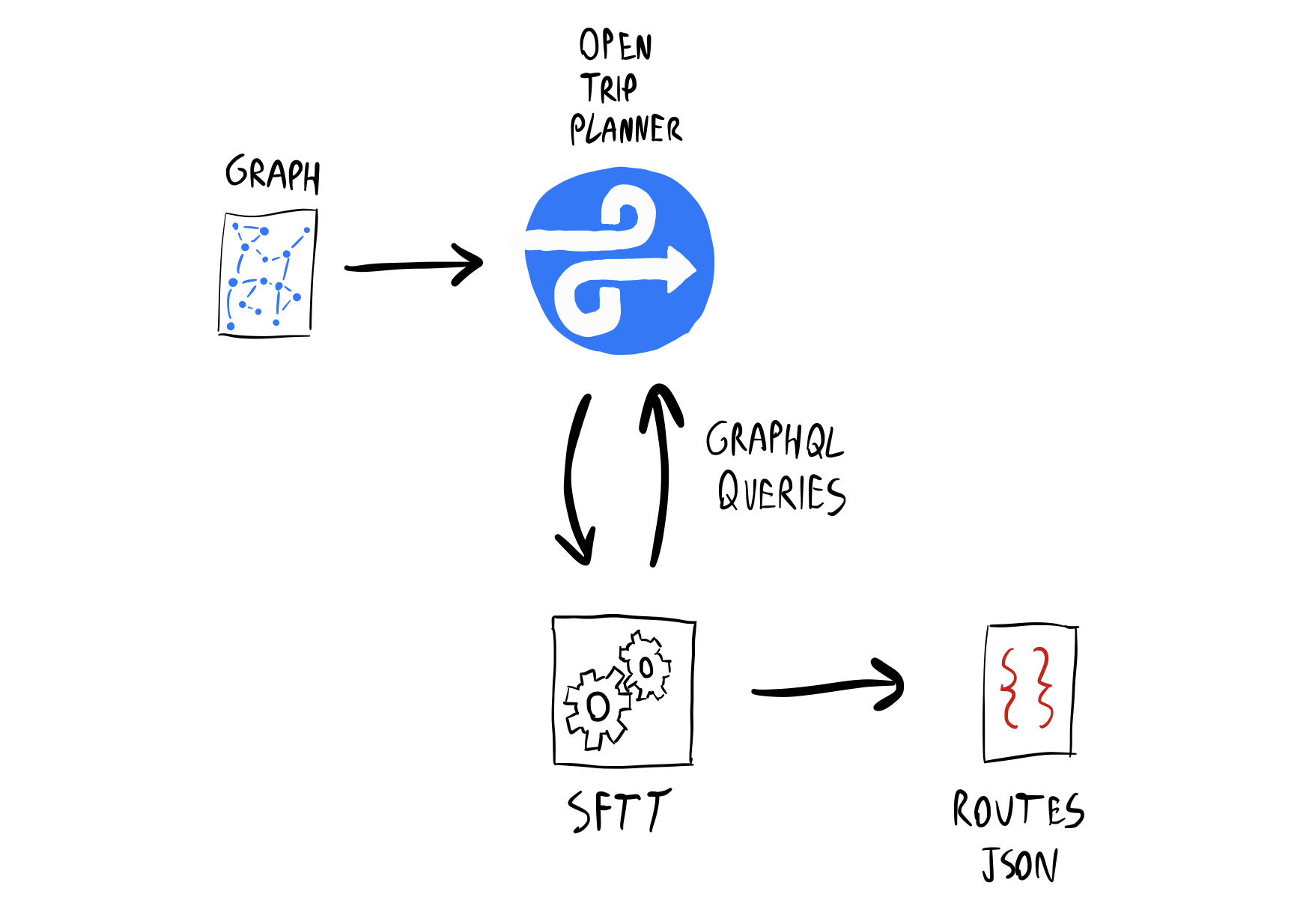
The tool that I created for Loconundrum is SFTT, SimpliFied Train Timetable2, a pile of scripts I’ve written to run two key pieces of open-source software together as a pipeline.
Everything happens in two distinct phases, with two separate executions of SFTT. I’ll talk about them separately and in-order.
Phase 1: Graph Generation
Rather than trying to implement my own graph generation and routing algorithms, I’ve combined two tools to do it for me:
-
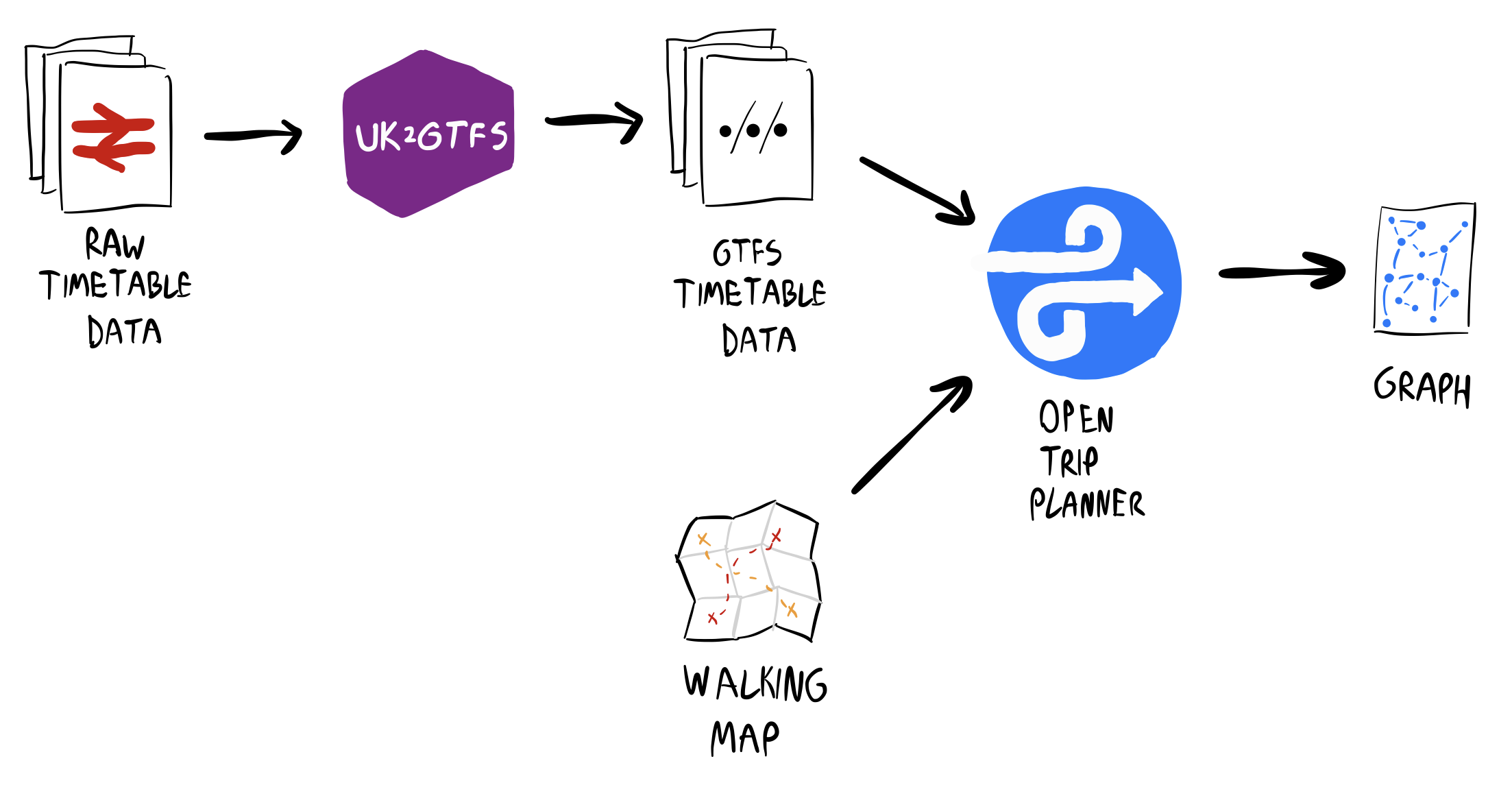
OpenTripPlanner, a powerful trip planning tool. It supports a variety of different transport modes, but I only need walking and public transit. This builds a graph using complicated weighting parameters to give sensible route results, avoiding unnecessary changes.
It takes public transit routes in the General Transit Feed Specification (GTFS) format. That’s a completely different format from the timetable data I downloaded from National Rail, so…
-
UK2GTFS, an R library to perform exactly that conversion, created by a team at the University of Leeds.3
Stringing together these two tools immediately got me most of the way there!
UK2GTFS’ output GTFS contained some inconsistencies for my timetable data, like a small number of missing stations. These specific cases were easy to fix up automatically with some scripting.
More significant was the lack of any walking route information. Sometimes a change on a train journey makes you walk between two nearby stations. Without walking information, OpenTripPlanner would refuse to generate many valid routes.
You can download OpenStreetMap data to provide OpenTripPlanner with realistic walking information. However, this is just too much data for me - OpenTripPlanner never even finished building the graph when left overnight on my poor MacBook.
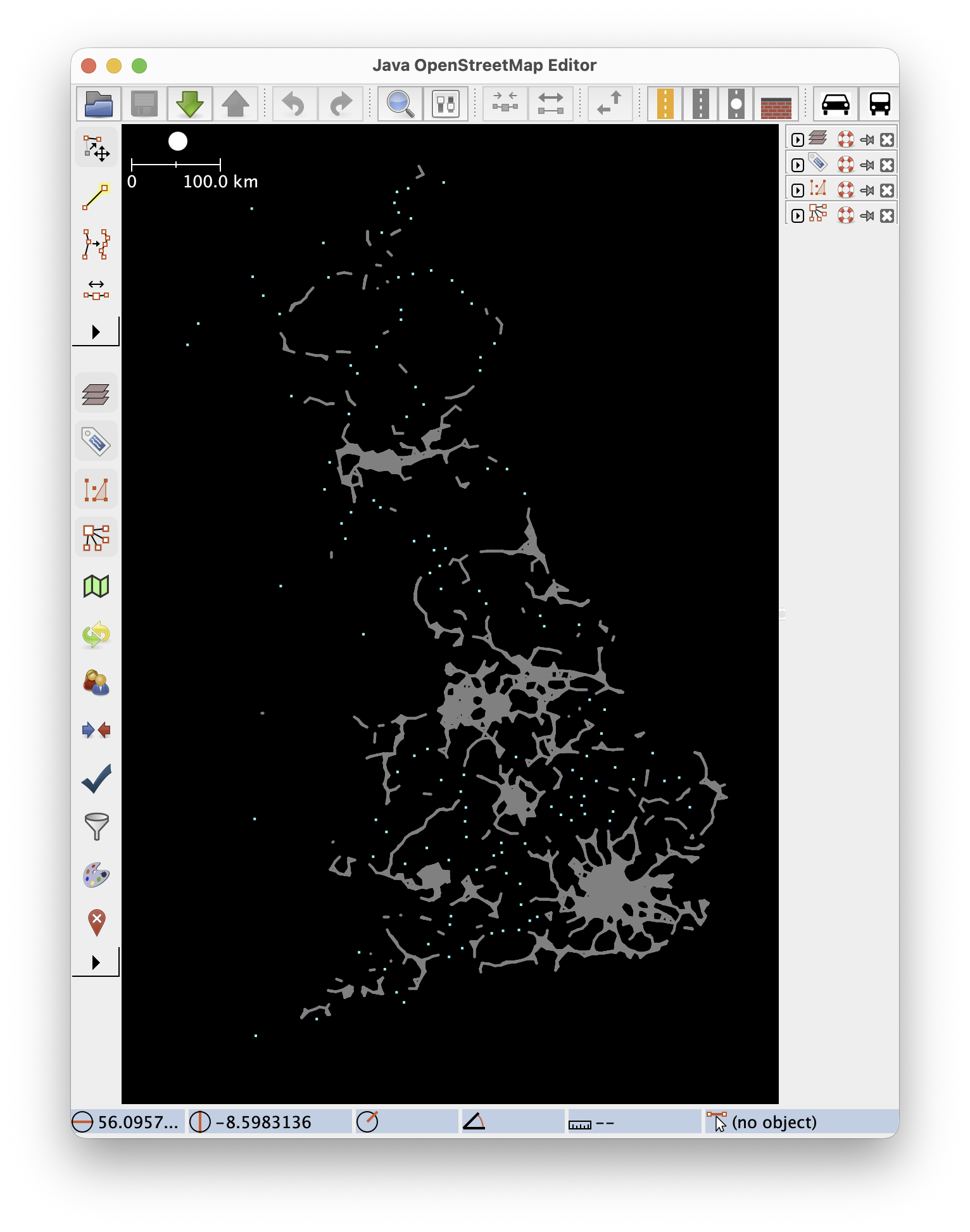
Instead, I took a shortcut and generated some OpenStreetMap XML which pretends there’s a dead-straight footpath between nearby stations. This tends to underestimate walking times, but walks between stations are usually short enough that this doesn’t matter too much.
The resulting Britain-shaped blob of footpaths helps us imagine the ultimate Walkable City:
With this walking map provided as an input to OpenTripPlanner alongside the GTFS data, we have our final Phase 1 pipeline:
Phase 2: Route Extraction
Generating the graph takes a little while (~45 minutes on an M1 Pro), so for Loconundrum, I’ve executed Phase 1 once and saved the result. However, Phase 2 is executed for every puzzle.
What do we do with that graph? Well, OpenTripPlanner also hosts a GraphQL server for planning routes. I can use this like that pricey National Rail RTJP API that I mentioned earlier, except this is self-hosted and free.
Suppose the day’s station for a particular Loconundrum puzzle is Leeds. I query the OpenTripPlanner API for routes many times: from each station, to Leeds.
OpenTripPlanner wants you to query for a specific time, but Loconundrum doesn’t need specific journey times. SFTT searches using an arbitrary date and time with a large search window, for the best chance of finding the fastest journey.
The GraphQL result for each route gets transformed into a JSON snippet like this:
// From Euston
"EUS": {
    "legs": [
        // Walk to Kings Cross
        {
            "mode": "walk",
            "from": "EUS",
            "to": "KGX",
            "duration": 600 // (seconds)
        },

        // Then get a train to Leeds, our destination
        {
            "mode": "rail",
            "from": "KGX",
            "to": "LDS",
            "duration": 7260
        }
    ]
}
All of those snippets get collected and saved into a single JSON file.
Totally Tubular
There’s actually a little bit more to Phase 2, after OpenTripPlanner as finished, which deserves its own section.
So far, I’ve been focusing on National Rail services, because that’s what’s in the timetable dataset. If you’re travelling through London though, there’s a decent chance that the Tube will be the best way to travel between stations that might be too far apart to walk.
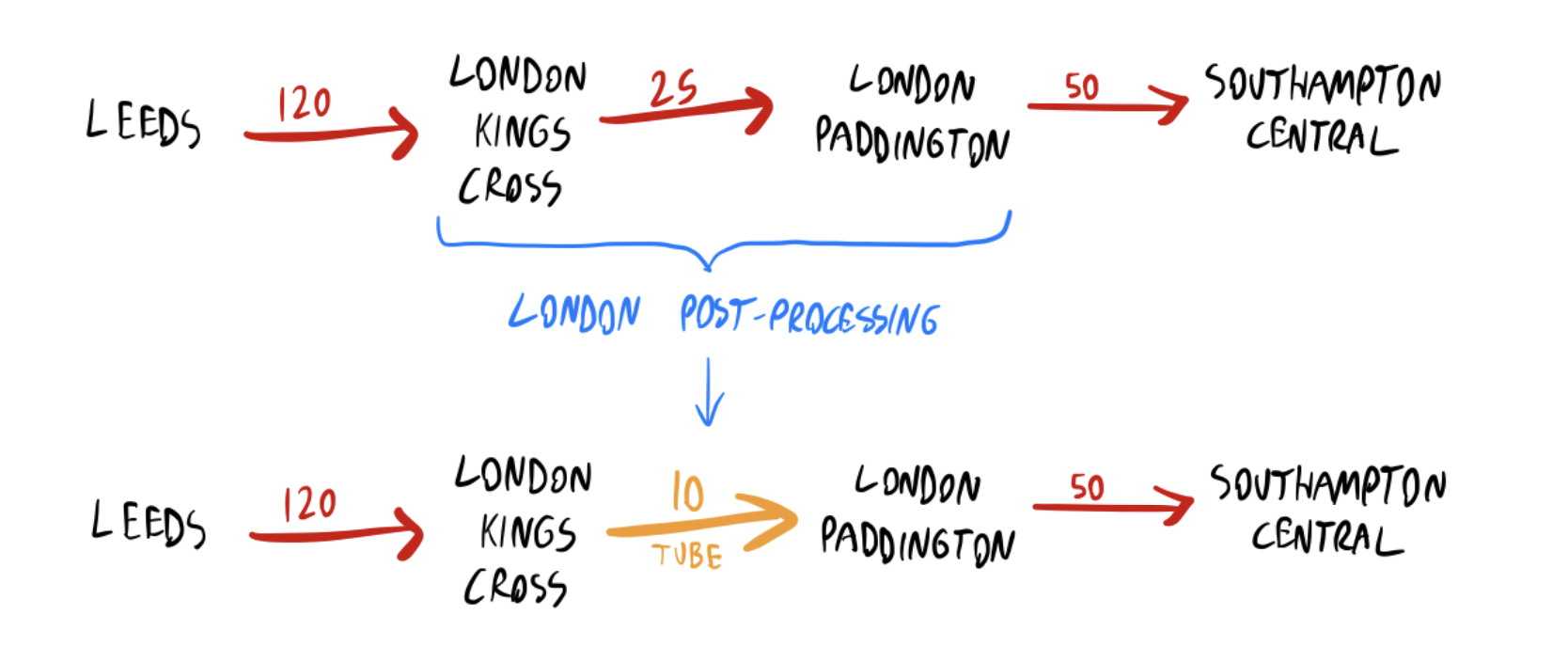
The first iteration of SFTT didn’t consider the Tube at all. This led to some wildly impractical routes when changes between London stations were involved - sometimes even suggesting using National Rail services to completely leave London and then return to another station, for what would have been a ~20 minute Tube journey. This was definitely something that needed fixing!
There are Tube GTFS datasets available, but when I tried loading one into OpenTripPlanner, something wasn’t working right; it just wouldn’t build in a reasonable time on my laptop.
Instead, the Tube is implemented in SFTT as a post-processing step. Using TfL Open Data’s free journey planner API, I pre-computed a list of the best ways to change between stations in London. If OpenTripPlanner’s route contains a pair of London stations, and TfL’s route is faster, then the segment is replaced.
There are other systems which might be worth supporting in a similar way - Manchester’s trams, for example - but the Tube was the only one causing a significant problem in playtesting.
How Loconundrum uses SFTT
SFTT is now my “solution-in-a-box”, where I provide the Loconundrum answer, and get journey times for every station that a player could possibly guess as a JSON file. SFTT runs in a cloud container the day before each puzzle, and dumps that JSON file in cloud storage. Then, Loconundrum can simply load this route file, and it has all of the puzzle data it needs!
The Loconundrum front-end served up to players is completely static, served by GitHub Pages. Running SFTT happens as a scheduled task completely separately from any interaction with Loconundrum.
The graph needs quite a lot of RAM (~24GB), so the SFTT container is quite pricey by the minute, but it only needs to run for about 15 minutes per day. This will cost me about £2/month to run, much less than National Rail RTJP.
Loconundrum itself is a relatively simple React app. After loading the routing data, it lets the player guess a station, then finds the route in the data and displays it. Guesses are saved to the browser’s local storage, so you can come back to a puzzle later in the day if you like.
The Wordle-style CRS code hints are all calculated client-side, and help give a little bit of guidance on top of the routes. For example:
| K | G | X |
The colours mean that K is in the answer’s CRS code, but not as the first letter; G is in the answer’s CRS code and in the correct position; and X isn’t in there at all.
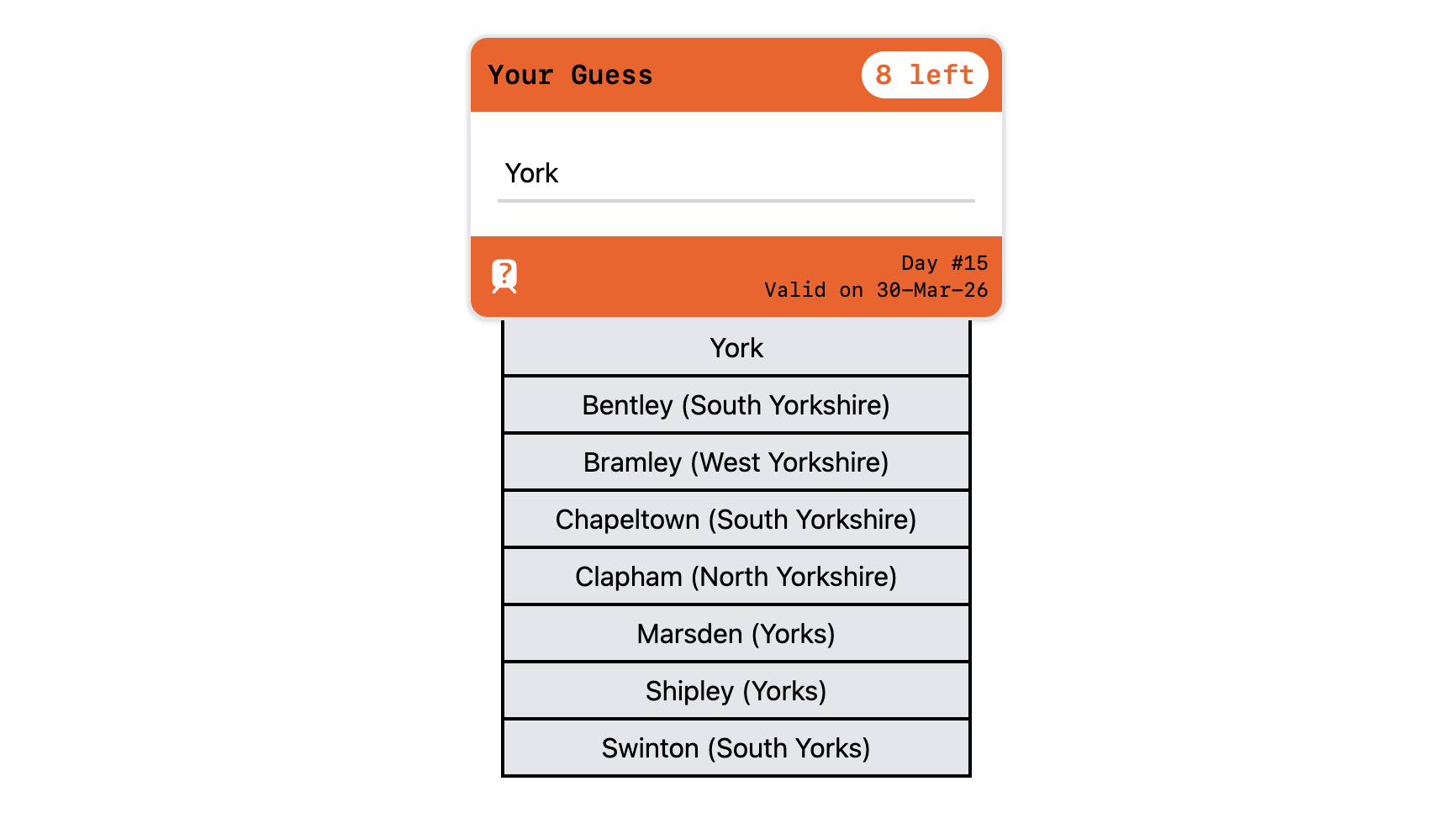
Finally, I just need a moment to gloat about the station search box which looks like a UK train ticket - I was quite pleased with this:
All Change, All Change
There’s so much potential with all of this rail data, and it’d be fun to think of some other projects to do with it.
To be honest, I was quite surprised nothing like SFTT existed before - I tried hard to find an existing solution, but never came across anything. (If you’re aware of one, let me know!) Approximate journey times feel like a generally useful thing, if you don’t need the complexity of real-time tracking or journey planning for specific times. Even though the RTJP API was in reach, there’s some feeling of accomplishment from cobbling together something that I can run myself for much cheaper.
As for Loconundrum: it’s a fun little game, I’m enjoying it, and I know some other people are too! Why not give it a go - I’d welcome any feedback on Bluesky or Mastodon.
At the end of the day, after all the palaver with figuring out how to make the routing work… I did finally get to do some React, so mission accomplished 😎
-
In the time between making Loconundrum and writing this blog post, there’s a message on the National Rail Data Portal that everything’s moving to a different system called the Rail Data Marketplace. So that’s exciting, I suppose. ↩
-
OK, look, SFTT was originally intended to stand for Stupid Fucking Train Thing, echoing my general mood at the time after spending ages looking for suitable APIs or trying to comprehend RAPTOR. It worked well enough in the end that I thought its final name deserved to be a bit kinder. ↩
-
Big up Leeds, that’s my city! I was going to write a joke about how they probably have a transport team just to prove that they should finally build the damn tram network, but it turns out they’ve literally been doing work on that recently, so… hats off to them! ↩